Technical Workshop · Live Session
v1.0 · 60 min
Hands-on · Build it locally
Building Autonomous
AI Agents with ADK
AI Agents with ADK
From chatbot to autonomous workflow — a developer's introduction
to Google's Agent Development Kit.
to Google's Agent Development Kit.
● Live coding workshop
|
Python 3.12+ · uv · google-adk
#ai-agents · #adk
IDC Delhi NCR · Offline Community Connect
Speaker Introduction
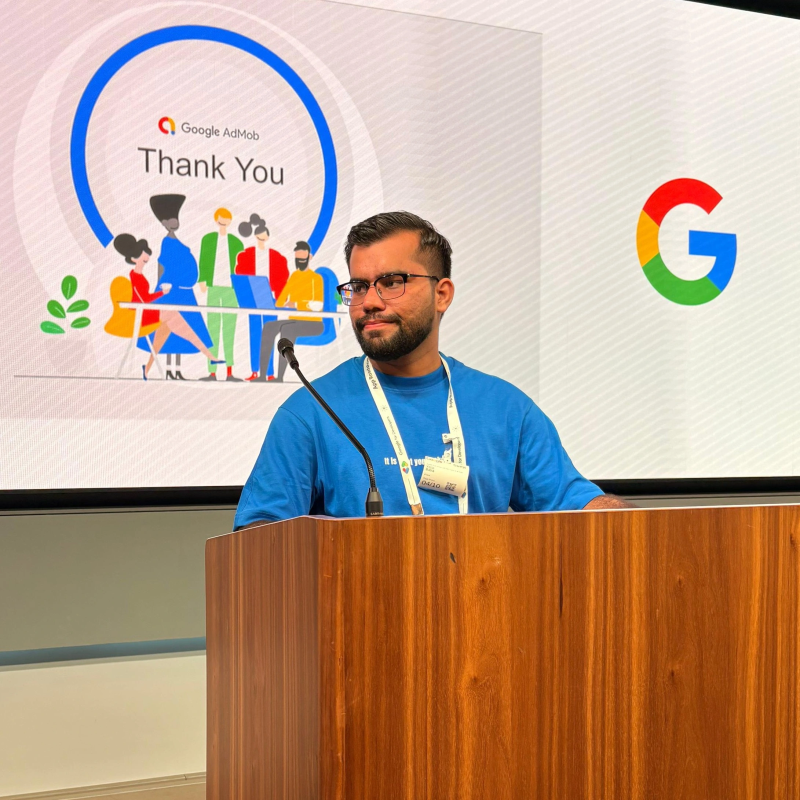
Yatin Batra
SDE 2 @ Adda247
Building scalable Android & Cross-Platform solutions for millions of users.
5+
Years Exp
10+
Projects
∞
Curiosity
▸ linkedin.com/in/yatin-batraa
▸ github.com/DeveloperYatin
Core Specializations
Android SDK
Flutter / Dart
Kotlin
System Design
Google ADK
Agentic AI
LLM Agents
AI
● IDC Delhi NCR | Offline Community Connect
#ai-agents · #google-adk · #autonomous
● Session Overview
02 / 18
What you'll walk away with.
A fully working agent — running locally, calling tools, answering real questions. Here's what it looks like:
localhost:8000 · ADK Web
① ADK Web UI
Agent → google_search tool in action
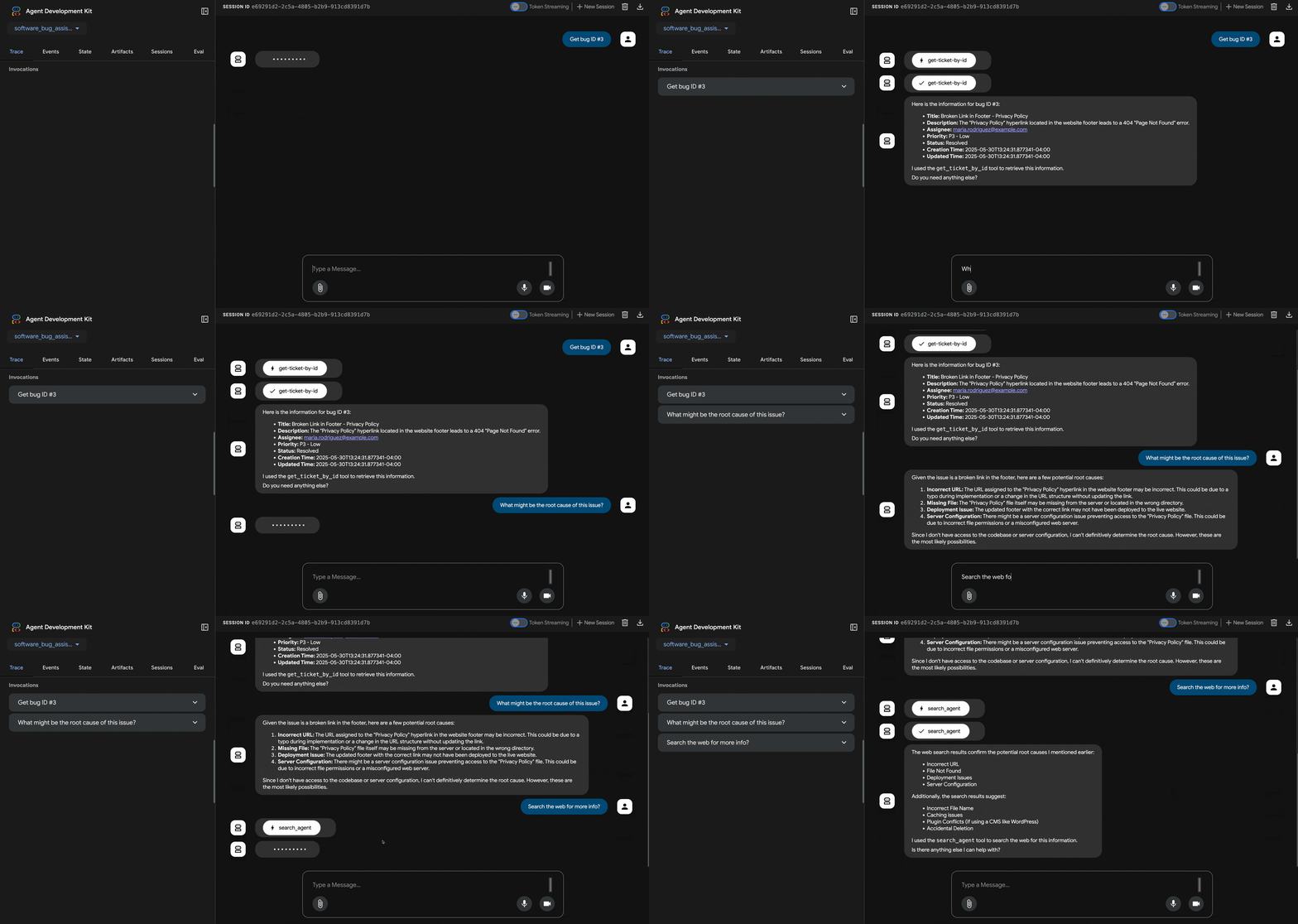
② Built-in Search Tool
This is what you'll build in the next 40 minutes. Let's go.
● Agenda
03 / 18
Three parts. One agent.
PART 1 · 8 MIN
Quick Intro
• What are AI agents?
• Why agents matter now
• Chatbots vs autonomous agents
• Core building blocks
• Google ADK in 60 seconds
• Why agents matter now
• Chatbots vs autonomous agents
• Core building blocks
• Google ADK in 60 seconds
PART 2 · 40 MIN
Hands-on
Workshop
Workshop
• Project setup with
•
• Write custom tools
• Run locally with
• Multi-agent patterns
• Test & iterate
uv•
adk create your first agent• Write custom tools
• Run locally with
adk web• Multi-agent patterns
• Test & iterate
PART 3 · 12 MIN
Wrap-up
• Best practices
• Production considerations
• Q&A + discussion
• Resources & next steps
• Production considerations
• Q&A + discussion
• Resources & next steps
≈ 60 minutes total · breaks built into Part 2 between milestones
● Part 1 · Foundations
04 / 18
What is an AI agent?
"
A system that uses an LLM as its reasoning engine to decide which actions to take, executes them via tools, and loops until the goal is met.
Why now?
01 Models can plan multi-step tasks reliably
02 Function calling & MCP give tools a protocol
03 Frameworks like ADK make it production-ready
02 Function calling & MCP give tools a protocol
03 Frameworks like ADK make it production-ready
Chatbot vs Autonomous Agent
— CHATBOT —
Reactive. Single-turn.
→ User asks, model answers from training data
→ Cannot reach outside the model
→ Stops at "here's information"
→ Cannot reach outside the model
→ Stops at "here's information"
— AUTONOMOUS AGENT —
Goal-driven. Multi-step.
→ User states a goal, agent decomposes it
→ Calls tools — search, code, APIs
→ Loops until the goal is achieved
→ Calls tools — search, code, APIs
→ Loops until the goal is achieved
An LLM answers. An agent acts.
● Part 1 · The Framework
05 / 18
Four blocks. One framework.
Every agent comes down to these
01 · TOOL CALLING
Model emits structured calls — runtime executes, feeds results back.
02 · REASONING
LLM decides which tool, in what order, with which arguments. Plan before acting.
03 · MEMORY
Session state, scratchpad, long-term store. Keeps the agent coherent across steps.
04 · WORKFLOWS
Sequential, parallel, branching. Sub-agents as specialists. One agent becomes a system.
Enter: Google Agent Development Kit
An open-source Python framework for building, evaluating, and deploying production-grade agents.
CODE-FIRST
Just Python.
No DSL, no YAML.
No DSL, no YAML.
Define agents as plain objects — test like any code.
BATTERIES INCLUDED
Search, code exec,
custom tools, MCP.
custom tools, MCP.
First-party tools + any Python function.
MODEL-AGNOSTIC
Gemini, GPT,
Claude, local.
Claude, local.
Optimized for Gemini but pluggable.
LOCAL → PROD
adk web day one.
Vertex AI day N.
Vertex AI day N.
Built-in dev UI, deploy to Agent Engine when ready.
$ uv pip install google-adk · one command, you're in.
● Part 2 · Hands-on
06 / 18
What we'll build together
A data analyst agent.
Ask your agent a question in English, get back a real answer — backed by web search, data analysis, and custom tools.
USER
"What are the top
trends in our data?"
trends in our data?"
▶
ROOT AGENT
data_analyst_agent
gemini-2.5-flash
Plans & routes calls
gemini-2.5-flash
Plans & routes calls
▶
TOOL · google_search
Real-time web lookups
TOOL · analyze_csv(file, q)
Custom data analysis tool
TOOL · file_upload
PDFs & unstructured data
▶
SYNTHESIZED ANSWER
"Based on your sales.csv,
revenue grew 12% MoM.
Industry trend confirms this."
revenue grew 12% MoM.
Industry trend confirms this."
Milestones
① Setup | ② Create agent | ③ Run locally | ④ Custom tools | ⑤ Multi-agent | ⑥ Test
● Prereq Recap
07 / 18
You should already have these
Prerequisites checklist.
These were shared ahead — 30 seconds to confirm everyone's ready. Raise a hand if anything's red.
✓
Machine
Laptop or desktop — macOS, Linux, or Windows
✓
Runtime
Python 3.12+ installed (any minor version 3.12.x works)
✓
Package manager
uv installed (fast Python package manager)✓
Isolation
Virtual environment set up & activatable
✓
Framework
google-adk installed in your venv✓
API Key
A Gemini API key (via Google AI Studio or
GOOGLE_API_KEY env var)
Next slide: a one-shot setup recipe to verify everything in 90 seconds.
● Milestone ① · Setup
08 / 18
Setup in six commands.
Step 1 · Verify tooling
# confirm Python & uv are on PATH
$ python3 --version
Python 3.12.x
$ uv --version
$ python3 --version
Python 3.12.x
$ uv --version
Step 2 · Project folder
$ mkdir -p ai-agents-adk && cd ai-agents-adk
Step 3 · Virtual env
# create & activate
$ uv venv
$ source .venv/bin/activate
(.venv) $ ready
$ uv venv
$ source .venv/bin/activate
(.venv) $ ready
Step 4 · Install ADK
$ uv pip install google-adk --no-cache
i
Windows users
Use
.venv\Scripts\activate instead of source .venv/bin/activate — everything else is identical across OSes.
👉 Once
google-adk installs cleanly, give a thumbs-up in chat. We move together.
● Milestone ② · Create
09 / 18
Your first agent.
Scaffold via CLI
$ adk create data_analyst_agent
? Model: gemini-2.5-flash
? Backend: Google AI
✓ created data_analyst_agent/
? Model: gemini-2.5-flash
? Backend: Google AI
✓ created data_analyst_agent/
What you get
data_analyst_agent/
├── __init__.py
├── agent.py # ← your root_agent lives here
├── .env # API key config
└── tools.py # your custom tool functions
├── __init__.py
├── agent.py # ← your root_agent lives here
├── .env # API key config
└── tools.py # your custom tool functions
agent.py — the heart of it
from google.adk.agents import Agent
root_agent = Agent(
model="gemini-2.5-flash",
name="data_analyst_agent",
description=(
"Analyzes data, answers questions"
"using search and custom tools."
),
instruction=(
"You are an expert data analyst."
"Use tools to find and analyze data."
"Always cite your sources."
),
tools=[], # ← we'll add tools next
)
root_agent = Agent(
model="gemini-2.5-flash",
name="data_analyst_agent",
description=(
"Analyzes data, answers questions"
"using search and custom tools."
),
instruction=(
"You are an expert data analyst."
"Use tools to find and analyze data."
"Always cite your sources."
),
tools=[], # ← we'll add tools next
)
Five fields. That's a working agent — model, name, description, instruction, tools. Everything else is detail.
👉 Run
adk create data_analyst_agent now — give a thumbs-up when done.
● Milestone ③ · Run
10 / 18
Run it. Watch it think.
The dev loop
(.venv) $ adk web
→ ADK dev UI ready at http://localhost:8000
→ ADK dev UI ready at http://localhost:8000
localhost:8000 · ADK Web
YOU → What are the top selling categories in sales.csv?
⚙ TOOL CALL · analyze_csv(file="sales.csv", question="top categories")
⚙ TOOL CALL · google_search(query="retail category trends 2025")
✓ Results returned
AGENT → Top 3 categories by revenue: Electronics ($412k), Clothing ($301k), Home & Garden ($289k). Industry data shows electronics growing 15% YoY.
What the dev UI gives you
▶ Chat — talk to your agent live
No frontend code needed.
No frontend code needed.
▶ Trace — every tool call, in order
Inputs, outputs, latency, errors.
Inputs, outputs, latency, errors.
▶ Inspect — see the raw prompt & response
Debug instructions in real time.
Debug instructions in real time.
▶ Reload — edit
agent.py, refresh, retry
First successful answer = a working agent. Now let's add custom tools.
● Milestone ④ · Custom Tools
11 / 18
Write your own tools.
Any Python function with type hints + a docstring becomes a tool the agent can call.
tools.py — custom data analyst tools
def analyze_csv(file_path: str, question: str) -> dict:
"""Analyze a CSV file and answer a question about it.
Args:
file_path: Path to the CSV file.
question: The analytical question to answer.
Returns: Dict with the analysis result.
"""
import pandas as pd
df = pd.read_csv(file_path)
return {"rows": len(df), "columns": list(df.columns)}
def calculate_metrics(data: list, metric: str) -> dict:
"""Calculate statistical metrics on a list of numbers.
Args:
data: List of numeric values to analyze.
metric: One of "mean", "median", "sum", "growth".
Returns: Dict with the computed metric value.
"""
import statistics
result = getattr(statistics, metric)(data)
return {"metric": metric, "value": result}
"""Analyze a CSV file and answer a question about it.
Args:
file_path: Path to the CSV file.
question: The analytical question to answer.
Returns: Dict with the analysis result.
"""
import pandas as pd
df = pd.read_csv(file_path)
return {"rows": len(df), "columns": list(df.columns)}
def calculate_metrics(data: list, metric: str) -> dict:
"""Calculate statistical metrics on a list of numbers.
Args:
data: List of numeric values to analyze.
metric: One of "mean", "median", "sum", "growth".
Returns: Dict with the computed metric value.
"""
import statistics
result = getattr(statistics, metric)(data)
return {"metric": metric, "value": result}
Wire it in — agent.py
from .tools import (
analyze_csv,
calculate_metrics,
)
root_agent = Agent(
...
tools=[analyze_csv, calculate_metrics],
)
analyze_csv,
calculate_metrics,
)
root_agent = Agent(
...
tools=[analyze_csv, calculate_metrics],
)
Rules for custom tools
✓ Type hints on all params & return
✓ Docstring describes when to use it
✓ Args section documents each param
✓ Return a dict or simple type
✓ Docstring describes when to use it
✓ Args section documents each param
✓ Return a dict or simple type
The model reads your docstring + type hints to decide when and how to call the tool.
Think of docstrings as prompts for the model.
Think of docstrings as prompts for the model.
👉 Create
tools.py with your functions, import in agent.py, reload adk web.
● Milestone ④ · Integration
12 / 18
Wire it all together.
agent.py — full data analyst with tools
from google.adk.agents import Agent
from google.adk.tools import google_search, AgentTool
from .tools import analyze_csv, calculate_metrics, file_upload
# Sub-agent for web research
search_agent = Agent(
name="search_agent",
model="gemini-2.5-flash",
instruction="Search the web for data and trends. Cite sources.",
tools=[google_search],
)
# Root agent — the data analyst
root_agent = Agent(
model="gemini-2.5-flash",
name="data_analyst_agent",
instruction=(
"You are an expert data analyst. Use search"
"for market trends. Use analyze_csv for local"
"data files. Always cite your sources."
),
tools=[
AgentTool(search_agent),
analyze_csv,
calculate_metrics,
file_upload,
],
)
from google.adk.tools import google_search, AgentTool
from .tools import analyze_csv, calculate_metrics, file_upload
# Sub-agent for web research
search_agent = Agent(
name="search_agent",
model="gemini-2.5-flash",
instruction="Search the web for data and trends. Cite sources.",
tools=[google_search],
)
# Root agent — the data analyst
root_agent = Agent(
model="gemini-2.5-flash",
name="data_analyst_agent",
instruction=(
"You are an expert data analyst. Use search"
"for market trends. Use analyze_csv for local"
"data files. Always cite your sources."
),
tools=[
AgentTool(search_agent),
analyze_csv,
calculate_metrics,
file_upload,
],
)
Three flavors of tool
Built-in
google_search, code_execFirst-party tools. Import and pass to
tools=[…].Custom Python Functions
analyze_csv, calculate_metricsAny typed function — docstring becomes the tool schema for the model.
MCP Servers
External tool servers via protocol
Plug in databases, APIs, file systems — any MCP-compatible server.
Pro tip: Use
AgentTool(sub_agent) to wrap any agent as a tool — the root agent can delegate to specialists.
Reload
adk web → ask "Analyze my sales.csv" → watch the tool call light up.
● The Loop
13 / 18
The autonomous loop.
What actually happens between "user prompt" and "final answer" — what makes it autonomous.
REACT LOOP
Think · Act · Observe
01 · PLAN
Decompose the goal.
"I need to analyze sales → call analyze_csv"
"I need to analyze sales → call analyze_csv"
02 · ACT
Emit a tool call.
analyze_csv(file="sales.csv", ...)
analyze_csv(file="sales.csv", ...)
03 · OBSERVE
Read the tool's output.
{"rows": 1200, "top_category": "Electronics"}
{"rows": 1200, "top_category": "Electronics"}
04 · DECIDE
Done, or loop again?
If goal met → reply. Else → plan again.
If goal met → reply. Else → plan again.
EXIT CONDITION → When the model judges the goal complete, it stops calling tools and emits a final response to the user.
Instructions shape when and how to use tools. Writing them well = 80% of agent quality.
● Multi-Agent Patterns
14 / 18
From one agent to a team.
The same primitive — an Agent — composes. Sub-agents become tools of an orchestrator agent.
ORCHESTRATOR
root_agent
decomposes & routes
decomposes & routes
SPECIALIST
search_agent
Market research & trends. Owns
google_search.SPECIALIST
data_agent
CSV & file analysis. Owns
analyze_csv.SPECIALIST
metrics_agent
Stats & computations. Owns
calculate_metrics.
ROUTER — orchestrator picks one specialist per turn.
PIPELINE — specialists run in sequence, output → input.
PARALLEL — fan out, fan in for synthesis.
Same code shape:
Agent(... tools=[AgentTool(other_agent), ...])
● Milestone ⑥ · Test
15 / 18
Drive it. Break it. Tune it.
Try these prompts in
adk webPROMPT 01 · WEB RESEARCH
"What are the top e-commerce trends for 2025? Cite sources."
→ should trigger google_search
PROMPT 02 · DATA ANALYSIS
"Analyze sales.csv — what are the top 3 categories by revenue?"
→ should call analyze_csv
PROMPT 03 · MIXED
"Compare our sales data with industry growth trends and give a summary."
→ should use BOTH tools, then synthesize
What "working" looks like in the trace
✓ Agent picks the right tool for the question.
✓ Tool calls have correct arguments.
✓ Failed tool call → agent retries with a fix.
✓ Final answer cites sources when using search.
✓ Tool calls have correct arguments.
✓ Failed tool call → agent retries with a fix.
✓ Final answer cites sources when using search.
✗ Uses search when a custom tool is better → refine instructions.
✗ Skips tools and answers from memory → add "always use tools".
✗ Endless tool loop → set
✗ Wrong arguments → improve docstrings.
✗ Skips tools and answers from memory → add "always use tools".
✗ Endless tool loop → set
max_iterations.✗ Wrong arguments → improve docstrings.
🎉 If you're here — you've shipped an agent. Pause & celebrate.
● Part 3 · Production
16 / 18
Demo → production.
01
Short, sharp instructions
Imperative + measurable: "Always cite sources. Use tools before answering." Avoid prose paragraphs.
02
Tool docs are prompts
The model reads your function's docstring & type hints. Write them for the model, not just for humans.
03
Bound the loop
Cap iterations, cap tokens, cap tool retries. An agent without limits is a runaway bill.
04
Human in the loop
Destructive actions (writes, deletes, sends) get an approval gate. Reads can be autonomous.
05
Trace + evaluate
Log every step. Build an eval set of canonical prompts. Watch regressions when you change instructions.
06
Least-privilege auth
Service accounts scoped per tool. Read-only by default. Audit what the agent did, not just what it said.
Treat agents like junior engineers with root access — supervise accordingly.
● Open Floor
17 / 18
Discussion · 10–15 minutes
Q&A.
Prompts to get us started
"
What's one workflow at your job you'd hand to an agent first — and what's the riskiest tool call it would need to make?
→ Personal
"
Where would you draw the line between agent-decides and human-approves? Read-only OK? Email send?
→ Safety
"
How would you measure whether your agent is actually better than the human workflow it replaced?
→ Evaluation
Mic's open. Type questions in chat too — we'll get to them.
●●●● Fin.
18 / 18
That's the workshop
Thank you. Go ship.
You now have a working agent on your laptop — keep iterating on it this week.
Resources to keep building
▶ ADK Getting Started
google.github.io/adk-docs/get-started
▶ ADK official docs
google.github.io/adk-docs
github.com/google/adk-python
github.com/google/adk-python
▶ Sample agents
github.com/google/adk-samples
data analyst · customer service · RAG · multi-agent
data analyst · customer service · RAG · multi-agent
▶ Deploy when ready
cloud.google.com/vertex-ai/generative-ai/
docs/agent-engine/overview
docs/agent-engine/overview
01 / 19